Understanding Key 3D Printing File Formats: STL, OBJ, AMF, and 3MF Side by Side
Introduction
Hello there! Welcome to our exciting journey through the world of 3D printing file formats. If you've ever dabbled in 3D printing, you know it's not just about having a great printer. The magic starts way before, with choosing the right file format for your model. Think of these formats as different languages that your printer understands.
In this guide, we're going to explore some of the most popular file formats like STL, OBJ, AMF, and 3MF. Each of these formats has its own strengths and quirks, kind of like different superheroes in a comic book! Picking the right one can mean the difference between a 3D print that's "meh" and one that wows.
So, why is choosing the right format so important? Well, it's like picking the right ingredients for a recipe. The better the ingredients, the tastier the dish. Similarly, the right file format ensures your 3D printer understands exactly what to do, leading to better print quality, efficiency, and a lot less hair-pulling frustration. Let's dive in and discover which format will be your 3D printing sidekick!
Understanding 3D Printing File Formats
Hey there, fellow 3D printing enthusiast! Let's chat about the role of file formats in 3D printing, a topic as essential as flour in bread-making. In the world of 3D printing, file formats are the blueprint from which your printer crafts its creations. They're like the detailed instructions telling your printer exactly what to build, layer by mystical layer.
Now, imagine you've designed a super cool object on your computer. To bring this digital masterpiece into the tangible world, your design needs to be translated into a language your printer can understand. This is where file formats come in. They're the intermediaries, transforming your design into something your printer can work with. The most popular pals in this gang are STL, OBJ, AMF, and 3MF. Each of these formats has its own way of describing the shapes, sizes, and sometimes even colors and textures of your 3D object.
But wait, there's more! Enter GCode - the mastermind behind the actual printing process. Think of GCode as the director of a movie, guiding the printer on the path it should take, how fast, and with what intensity. It's a step-by-step guide for the printer's movements, like where to move, how fast to extrude the filament, and even when to take a little break. GCode is like the final, detailed script derived from your original file format, tailored specifically to your printer's capabilities.
In summary, while model file formats (STL, OBJ, etc.) are like the initial sketches of your 3D model, GCode is the full-blown, printer-specific instruction manual. Both are crucial in the art of 3D printing, ensuring that what you imagine and design on your screen comes to life just the way you envisioned it.
STL: The Pioneering Standard
History and Development
Alright, let's turn the clock back to 1987 – a time when hairstyles were big, and the concept of 3D printing was just taking baby steps. This was the year the STL file format was born, thanks to the innovative minds at 3D Systems Inc. They developed STL (which stands for Stereolithography, or Standard Triangle Language) for their first 3D printer. Since then, STL has become something of a legend in the 3D printing world.
Origin and Evolution of the STL Format
STL's journey is kind of like a classic car – it's been around for a while but still has that charm. Initially created to suit the stereolithography printing method, it’s fascinating how STL remains widely used despite the massive advancements in 3D printing technologies. Its simplicity and compatibility have given it staying power, kind of like your favorite old pair of jeans.
Characteristics of STL Files
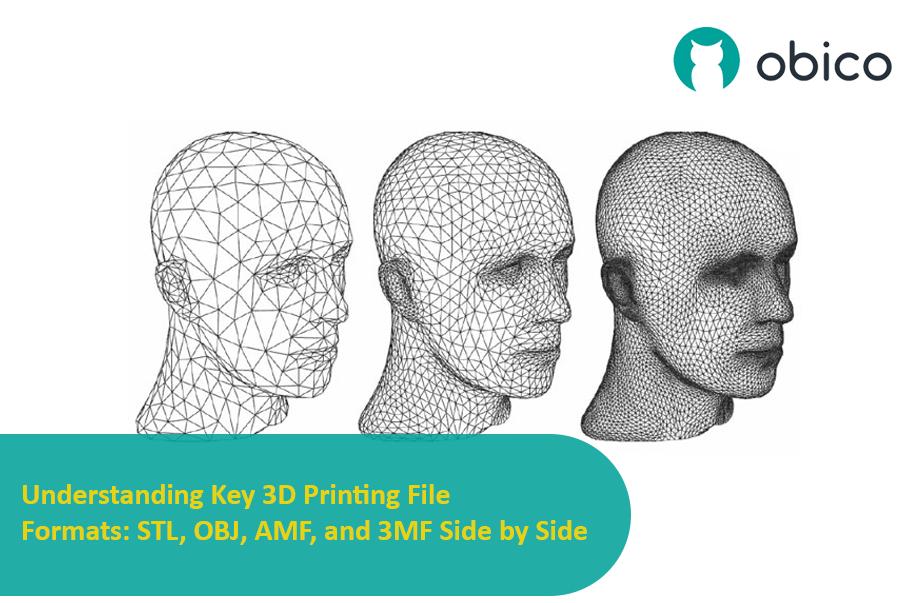
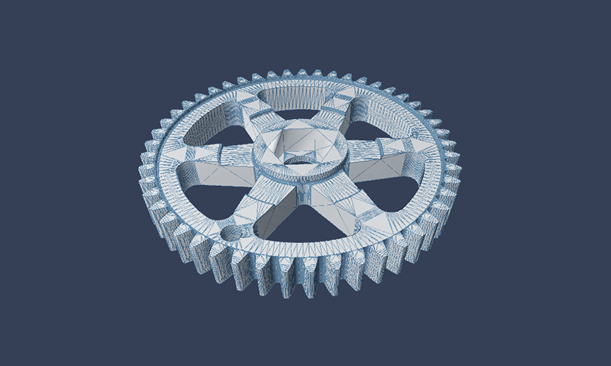
Imagine STL files as a digital sculptor. They work by breaking down your 3D model into a series of tiny triangles, covering every surface like a mesh. This approach is a bit like using tiny building blocks to approximate the shape of your model. The more triangles you use, the smoother and more detailed your final print is going to be.
Advantages and Limitations
Now, let's talk pros and cons. On the plus side, STL's simplicity is its biggest charm. It’s like the basic vanilla ice cream that goes well with everything – it's widely supported, easy to use, and pretty much the go-to option in the 3D printing community.
But, it's not all sunshine and rainbows. STL has its limitations. Remember those triangles? Well, they can only capture the surface geometry of your model. They don’t include color, texture, or other fancy details. Plus, if you're all about precision and intricate details, STL might leave you wanting more. Its approximation with triangles means you might lose some of the finer elements of your design, especially in complex models.
OBJ: The Versatile Alternative
Usage and Flexibility
Step aside STL, and let's shine the spotlight on OBJ, the versatile contender in the 3D modeling world. Born from the realms of advanced computer graphics, OBJ has a flair for flexibility that extends well beyond the boundaries of 3D printing. It's like that multi-talented friend who’s not only good at sports but also aces in art and music.
In the broader world of 3D applications, OBJ is a bit of a celebrity. Its uses range from detailed model creation in video games and movies to intricate architectural visualizations. This format is like a chameleon, adapting effortlessly to various requirements across different industries. It’s not just about printing a model; it’s about bringing complex, richly detailed 3D creations to life in a virtual space.
Properties and Complexities
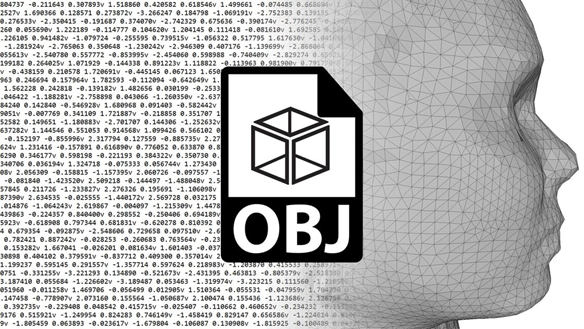
Now, let’s dive into the nitty-gritty of what makes OBJ really stand out. Imagine OBJ as a skilled artist, capable of capturing not just the shape of your model but also its texture, color, and even the very essence of its material. This format can store detailed information about a model's surface, such as where it should be shiny, matte, or even transparent.
What’s more, OBJ files can handle a diverse range of geometric shapes. Unlike STL, which relies solely on triangles, OBJ is fluent in multiple geometric languages – it can speak in polygons, free-form curves, and surfaces. This means you get a much more accurate representation of complex shapes and surfaces.
However, with great power comes great complexity. OBJ files can be quite intricate, storing a wealth of information that goes beyond simple 3D printing needs. This complexity means they can be larger in size and might require more powerful software to process them efficiently. Plus, they might be a bit of an overkill for simple 3D printing tasks, like printing a basic prototype or a straightforward part.
AMF: Advanced Manufacturing File Format
Evolution from STL
Let's talk about the AMF (Additive Manufacturing File Format), often hailed as the next-gen successor to the venerable STL. Picture AMF as the new kid on the block who's learned a few extra tricks from the older STL. Developed with an eye towards addressing some of STL's limitations, AMF stepped onto the scene with a promise of bringing more to the table. It's like upgrading from a basic phone to a smartphone – there are a lot more features to play with.
Describe AMF as the Successor to STL and Its Improvements
AMF is like STL’s smarter cousin. While STL could only describe the surface geometry of objects using triangles, AMF takes it several notches higher. It brings color, materials, and even multiple textures into the mix. Imagine a 3D model not just as a shape but as a full-fledged object with varied colors and materials – that’s the kind of detail AMF is capable of handling.
Another leap forward is how AMF handles geometry. It uses curved triangles, allowing for more accurate and intricate representations of curved surfaces. This means smoother prints with fewer of those jagged edges that STL sometimes leaves behind.
Features and Industry Support
AMF is not just about aesthetics, though. It also supports more technical features, like lattice and gradient structures, which can be crucial for specific engineering applications. These features open up new possibilities in lightweighting and material efficiency, essential in sectors like aerospace and automotive.
But here’s the catch – despite its advanced features, AMF hasn’t quite caught on like wildfire. The reason? It’s a bit like having a super advanced gadget that most people don’t know how to use or don’t need all the features of. The 3D printing industry is still cozy with STL, and moving to a new format takes time and effort. Plus, not all slicing software and printers are fully geared up to take advantage of everything AMF offers.
3MF: The Future of 3D Printing Files?
Consortium and Development
Imagine a group of tech giants and 3D printing aficionados coming together, like a superhero team-up, to create something groundbreaking. That's the story behind the 3MF Consortium. Formed by industry heavyweights like Microsoft, Autodesk, HP, and several others, the consortium aimed to develop a new, more capable file format for 3D printing. Their mission? To address the shortcomings of existing formats and set a new standard for the future. Think of it as a council of wise wizards, crafting a powerful new spell for the 3D printing world.
Advantages Over Other Formats
The 3MF file format is like a Swiss Army knife – versatile, packed with features, and surprisingly compact. One of its standout features is its ability to encapsulate not just the model's geometry, but also rich information like color, texture, and even printing directions, all in a single file. Imagine being able to store not just the sculpture but also its color palette, sheen, and the instructions on how to sculpt it – that's 3MF for you.
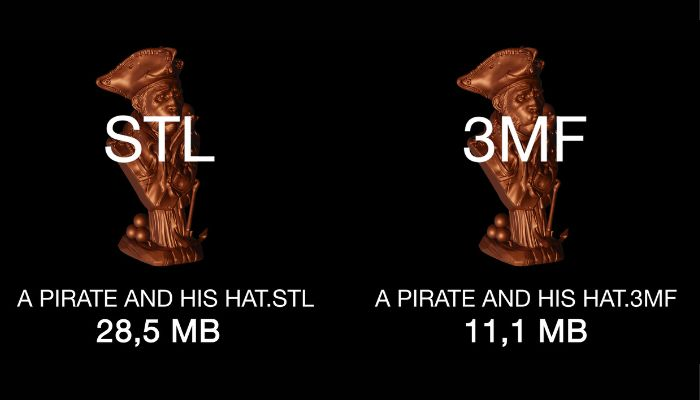
Another significant advantage is its use of a compressed ZIP format. This means 3MF files are not only more comprehensive in the information they carry but also efficient in size. It’s like packing an entire wardrobe into a carry-on suitcase – everything you need in a compact, easy-to-handle package.
Current Adoption and Prospects
Now, how's the world responding to 3MF? Well, it's gaining momentum. More and more software and hardware in the 3D printing realm are embracing 3MF, recognizing its potential to make 3D printing processes smoother, more detailed, and more reliable. However, it’s not an overnight sensation – change takes time, especially in a field as diverse and established as 3D printing.
But the prospects look bright. With its robust capabilities and the backing of some of the biggest names in the industry, 3MF is well-positioned to become the new standard. It’s like watching a rising star in the music world – not quite at the top of the charts yet, but with the talent and support to get there soon.
Comparative Analysis
STL vs. OBJ vs. AMF vs. 3MF
Let's line up our contenders in the 3D printing file format arena and see how they stack up against each other. It's like comparing different types of cars - each has its own strengths and ideal use cases.
STL: The Old Faithful
Features: Uses triangles to represent model surfaces.
Advantages: Universally accepted, simple, great for basic shapes and prototypes.
Limitations: Lacks support for color, texture, and complex geometries.
OBJ: The Detailed Artist
Features: Supports complex geometries, textures, and materials.
Advantages: Ideal for detailed models with textures, used in gaming and animation.
Limitations: Larger file sizes, complexity can be overkill for simple prints.
AMF: The Advanced Contender
Features: XML-based, supports colors, materials, and more sophisticated geometries.
Advantages: More precise and detailed than STL, better for complex applications.
Limitations: Less widespread adoption, compatibility issues with some software/hardware.
3MF: The Rising Star
Features: Compressed ZIP format, includes comprehensive data like color, texture, and print settings.
Advantages: Highly detailed, efficient in storage, backed by major industry players.
Limitations: Still gaining ground in terms of widespread acceptance and usage.
Industry Trends and Preferences
Now, let's take the pulse of the industry. STL, like a trusty old truck, still has a loyal following due to its simplicity and wide compatibility. It’s the go-to for basic printing needs. However, the wind is changing direction. There’s a growing appreciation for more detail and functionality in 3D printing files, much like how smartphone users crave more features.
OBJ is popular in fields where detail is king, like gaming and animation. It's like the sports car of the file formats – not necessary for a trip to the grocery store, but invaluable for the right track.
AMF, with its advanced capabilities, is waiting in the wings, but it’s a bit like a high-tech gadget that not everyone knows how to use yet. It has the potential, but needs more industry support to really shine.
3MF seems to be the one to watch, like an electric car that’s rapidly gaining popularity. It’s versatile, efficient, and has the backing of major players, making it a strong candidate for the ‘file format of the future’.
Practical Considerations in File Format Selection
Factors Influencing Choice
When it comes to selecting the right file format for your 3D printing project, think of it as choosing the right outfit for an occasion. You wouldn't wear a tuxedo to a beach party, right? Similarly, the choice of file format heavily depends on what you're looking to achieve, the printer you have, and the software you're using.
Project Requirements: This is like the theme of your party. Are you working on a detailed architectural model or a simple phone stand? If your project requires high detail, textures, and color, formats like OBJ or 3MF are your go-to. For simpler tasks, STL might be just enough.
Printer Compatibility: This is like knowing the dress code. Not all printers speak the same 'file format language.' Some printers work best with certain formats, so it's crucial to check what formats your printer supports. Using an incompatible format is like showing up to a black-tie event in shorts and flip-flops – it just won't work.
Software Influence: Consider this as the tools at your disposal. The software you use for designing and slicing can greatly influence your file format choice. Some software may offer more features or better support for specific formats. It’s about using what enhances your capabilities the best.
Importance of Compatibility and Functionality
The harmony between your file format, printer, and software is key. It's like a well-coordinated dance trio. If one is out of sync, the performance falters. Here’s why compatibility and functionality are so crucial:
Optimal Use of Printer Capabilities: Every printer has its strengths and limitations. Matching the file format with your printer’s capabilities ensures that you make the most out of its features. It’s like playing to your strengths.
Software Synergy: The software you use to prepare your 3D model (like CAD software) and the one to slice the model (slicer software) must work in tandem with your chosen file format. This ensures a smooth workflow from design to print.
Quality of the Final Print: The right combination of file format, printer, and software leads to a higher quality final product. It’s about bringing your vision to life in the best possible way.
FAQs on 3D Printing File Formats
Q1: What is the most user-friendly 3D printing file format for beginners?
A1: STL is generally considered the most user-friendly and widely accepted format for beginners due to its simplicity and extensive compatibility with 3D printers and software.
Q2: Can I use OBJ files for multicolor 3D printing?
A2: Yes, OBJ files can support multicolor and multi-material printing because they can store information about textures and colors, making them suitable for detailed and colorful prints.
Q3: Are AMF files better than STL files?
A3: AMF files are more advanced than STL files, offering support for colors, materials, and more intricate geometries. However, their adoption is limited compared to the more universally accepted STL format.
Q4: Is 3MF the future standard for 3D printing file formats?
A4: 3MF has the potential to become a future standard due to its comprehensive data storage capabilities, including color, texture, and print settings. Its growing acceptance in the industry indicates a shift towards more advanced file formats.
Q5: Can I convert an STL file to an OBJ or 3MF file?
A5: Yes, it's possible to convert STL files to OBJ or 3MF formats using various software tools. However, converting to 3MF or OBJ won't add color or texture information if it's not present in the original STL file.
Q6: What software do I need to view or edit 3MF files?
A6: To view or edit 3MF files, you'll need 3D modeling or slicing software that supports the 3MF format. Many modern 3D software tools, including some free ones, now offer support for 3MF.
Q7: Can I use 3D printing file formats for non-printing purposes like animation and gaming?
A7: While formats like OBJ are versatile and can be used for animation and gaming, 3D printing formats like STL and AMF are primarily designed for printing purposes and may lack the necessary features for other applications.
Q8: How do I choose the best file format for my 3D printing project?
A8: Consider the level of detail required, printer compatibility, software you're using, and the specific needs of your project (like color or material requirements). For simple projects, STL might suffice, while complex projects might benefit from OBJ or 3MF formats.
Q9: Do all 3D printers support the 3MF file format?
A9: Not all 3D printers currently support 3MF. It's important to check your printer's specifications or consult the manufacturer to confirm compatibility with 3MF files.
Q10: What are the main limitations of using STL files for 3D printing?
A10: The main limitations of STL files include their inability to store color, texture, and material information, and their reliance on triangles for geometry representation, which can result in less precise rendering of curved surfaces.
Conclusion
And there we have it – a deep dive into the diverse world of 3D printing file formats! Just like a painter needs to understand the different brushes and paints at their disposal, anyone venturing into 3D printing must grasp the nuances of these various formats. Each format, be it the straightforward STL, the detail-rich OBJ, the advanced AMF, or the promising 3MF, has its unique role and specialty.
Understanding these formats is like unlocking different levels of potential in your 3D printing journey. It’s not just about what your printer can do; it’s about choosing the right language to communicate your vision effectively to your printer. This choice can make a world of difference in the fidelity, functionality, and overall quality of your printed object.
So, as you stand at the crossroads of your next 3D printing project, take a moment to consider the needs of your design. Are you chasing precision and intricacy, or are you in the realm of simple prototypes? Do you need a burst of color, or are textures and advanced materials part of your plan? Your answers to these questions will guide you to the right file format.
In the ever-evolving landscape of 3D printing, staying informed and adaptable is key. Whether you're a hobbyist tinkering in your garage or a professional pushing the boundaries of manufacturing, the choice of file format is a crucial step in the dance of creation. Choose wisely, print boldly, and let your 3D dreams take flight!