Is Obico Free? Pricing, Plans, and What You Actually Get

Obico has a permanent free plan that includes AI failure detection (10 hours/month), remote printer access, webcam streaming, and mobile app support for 1 printer. No credit card required. A Pro plan is available at $4/month (billed annually) for more AI hours, unlimited tunnel data, and multi-printer support. There's also a completely free self-hosted option with no limits at all.
One of the most persistent misconceptions we see about Obico is that it "requires a paid subscription." It doesn't. We've offered a free tier since day one, and we intend to keep it that way.
This guide breaks down exactly what you get at every pricing tier so you can decide what's right for your setup.
💰 What Does Obico's Free Plan Include?
The free plan is not a trial — it's a permanent tier with real, useful features.
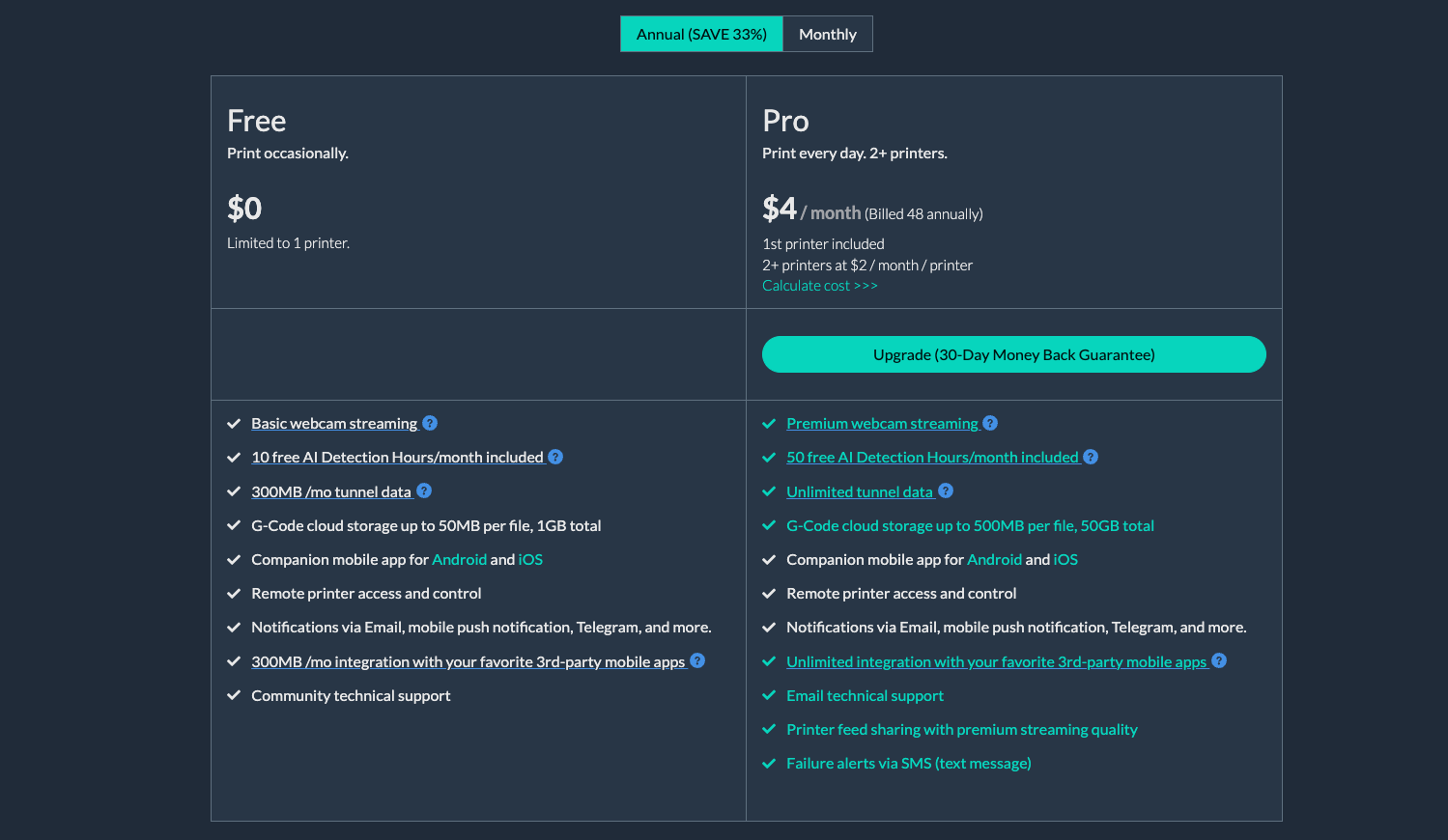
Here's what you get at $0/month:
| Feature | Free Plan |
|---|---|
| Printers | 1 |
| AI Detection Hours | 10/month |
| Webcam streaming | Basic |
| Tunnel data | 300 MB/month |
| G-Code storage | Up to 50 MB/file, 1 GB total |
| Mobile app (Android + iOS) | ✅ |
| Remote printer access & control | ✅ |
| Notifications (email, push, Telegram) | ✅ |
| Community support | ✅ |
AI Detection Hours (DH) are the unit Obico uses to measure how long the AI is actively analyzing your webcam feed. 10 hours/month is enough for occasional prints or shorter jobs. If you're running the printer a few hours a week, the free tier will likely cover you.
The 300 MB/month tunnel allowance means you can access your printer remotely through Obico's secure tunnel — no router port forwarding or VPN needed. You may hit the data cap if you stream video heavily, but for checking on prints it's more than enough.
The mobile app, remote start/stop/pause, push notifications, email and Telegram alerts — all included. You're not getting a watered-down demo. You're getting a genuinely useful 3D printer monitoring tool.
⭐ Obico Pro Plan — Who Needs It?
The Pro plan at $4/month (billed annually, $48/year) is designed for people who print frequently or run multiple printers.
You'd benefit from Pro if:
- You print more than 10 hours/month — Pro includes 50 AI Detection Hours/month, 5× the free tier
- You have more than one printer — Pro adds additional printers at $2/printer/month
- You use a lot of remote access — Pro includes unlimited tunnel data (no 300 MB cap)
- You want premium webcam streaming — higher resolution, smoother feed
- You need large G-Code file storage — up to 500 MB/file and 50 GB total
- You want SMS alerts — available on Pro only
- You integrate with third-party apps — unlimited integrations on Pro vs. limited on Free
The first printer is included in the Pro price. Additional printers are $2/month each. So if you have 3 printers: $4 + $2 + $2 = $8/month for 24/7 AI-monitored printing across all three.
Pro also comes with email support (not just community forums) and a 30-day money-back guarantee — no questions asked.
🔋 Pro Plan Add-Ons: AI Detection Hour Packs
If you need more AI Detection Hours beyond what your plan includes, you can buy pre-paid packs:
| Pack | Price | Notes |
|---|---|---|
| 200 DH | $10 | ✅ One-time, never expire |
| 500 DH | $20 | ✅ One-time, never expire |
These are available to all plans including Free. So if you're on the free plan and you want to run a big print marathon one month, you can buy a 200 DH pack for $10 and get through it without upgrading.
Pro subscribers can also set up Subscribe & Save packs that roll over month to month:
| Monthly DH | Monthly Price | Per-Hour Cost |
|---|---|---|
| 80 DH/mo | $2/mo | $0.025 |
| 300 DH/mo | $5/mo | $0.017 |
| 800 DH/mo | $10/mo | $0.013 |
| 2,500 DH/mo | $20/mo | $0.008 |
The 2,500 DH/mo Subscribe & Save pack at $20/mo works out to less than 1 cent per detection hour — the most economical option for print farms or heavy users.
📊 Free vs Pro: Side-by-Side Comparison
| Feature | Free | Pro |
|---|---|---|
| Monthly cost | $0 | $4/mo (billed annually) |
| Annual cost | $0 | $48/year |
| Printers | 1 | 1 + $2/mo per additional |
| AI Detection Hours | 10/month | 50/month |
| Webcam streaming | Basic | Premium |
| Tunnel data | 300 MB/month | ✅ Unlimited |
| G-Code file limit | 50 MB/file, 1 GB total | 500 MB/file, 50 GB total |
| Mobile app | ✅ | ✅ |
| Remote access & control | ✅ | ✅ |
| Notifications | Email, push, Telegram | Email, push, Telegram, SMS |
| 3rd-party integrations | Limited | ✅ Unlimited |
| Support | Community | |
| Money-back guarantee | — | ✅ 30 days |
The annual Pro plan saves 33% vs month-to-month billing. For most dedicated makers, $48/year works out to less than the cost of one failed print that Obico catches.
🖥️ Obico Self-Hosting — Unlimited Everything for Free
This is the option that often surprises people: Obico is fully open-source, and you can self-host the entire platform on your own hardware for free.
Self-hosting gives you:
- ✅ Unlimited printers — no per-printer fees
- ✅ Unlimited AI Detection Hours — the AI runs locally on your hardware
- ✅ No tunnel data limits — you control the networking
- ✅ Complete data privacy — nothing leaves your local network
- ✅ Full feature access — everything in the Pro plan, locally
The server code is available on GitHub (TheSpaghettiDetective/obico-server). It runs on Linux (Docker-based) and the community maintains detailed setup documentation.
Self-hosting requires a server — typically a Raspberry Pi, NAS, or an old PC running Docker. The AI detection component benefits from a GPU for real-time analysis, though it works on CPU too (just slower). Some familiarity with Docker and the Linux command line is needed for setup.
This is the right choice for people who run a print farm, work in environments with strict data policies, or simply prefer keeping everything in-house.
If you just want something that works immediately with no setup, the free cloud plan is the easier starting point.
🏆 How Obico Compares to Competitors on Price
| Platform | Free Tier | Paid Tier | AI Failure Detection | Self-Hosting |
|---|---|---|---|---|
| Obico | ✅ 1 printer, 10 DH/mo | $4/mo (annual) | ✅ Core feature | ✅ Fully open-source |
| OctoEverywhere | ✅ Basic tunnel | ~$5/mo | ⚠️ Limited (Gadget, add-on) | ❌ |
| SimplyPrint | ✅ 1 printer, limited | From ~$10/mo | ⚠️ Basic | ❌ |
| AstroPrint | ✅ 1 printer, limited | From ~$9/mo | ⚠️ Basic | ⚠️ Partial |
OctoEverywhere is primarily a tunneling service — its strength is fast, low-latency remote access. Its AI failure detection (called "Gadget") is available but not the primary focus. Obico's AI is more mature and has been trained on a larger dataset.
SimplyPrint is a full print farm management platform. It's powerful but also significantly more expensive once you go beyond a single printer. Built for professional environments more than individual hobbyists.
AstroPrint is one of the older players. Their AI monitoring is less developed, and the platform has seen less active development in recent years compared to Obico.
Obico's combination of a meaningful free tier, low-cost Pro plan, and fully open-source self-hosting option gives it one of the best value propositions in the category — especially for makers who want AI failure detection without a big subscription commitment.
For a detailed feature comparison with OctoEverywhere specifically, see our Obico vs OctoEverywhere breakdown.
❓ Frequently Asked Questions
Is Obico really free, or is it a limited trial?
The free plan is permanent, not a trial. There's no expiration date and no requirement to enter a credit card. You get 1 printer, 10 AI Detection Hours/month, remote access, and the mobile app — forever, at no cost.
Do I need a credit card to sign up for the free plan?
No. You can create an Obico account and start using the free plan without providing any payment information.
What happens when I run out of AI Detection Hours?
When your monthly AI Detection Hours are used up, Obico stops analyzing your webcam feed for failures — but all other features keep working. You can still access your printer remotely, view the webcam, and receive notifications. The AI just won't be actively watching until your hours reset next month (or until you buy a DH pack).
Can I upgrade from Free to Pro later?
Yes, at any time. Your existing printer configurations and settings carry over. If you upgrade mid-month, you'll get the Pro benefits immediately.
Can I switch back from Pro to Free?
Yes. If you cancel Pro, you'll drop back to the free tier limits at the end of your billing period. You won't lose your account or printer configurations.
What are AI Detection Hours exactly?
AI Detection Hours (DH) measure the cumulative time Obico's AI is actively monitoring your print. If you start a 3-hour print with AI detection enabled the whole time, that uses 3 DH. The AI doesn't run when you're not printing, so it won't drain your hours just by having the app open.
Is self-hosting really free with no limits?
Yes. When you self-host Obico on your own server, there are no usage limits, no subscription fees, and no per-printer charges. You're running the full software stack on your own hardware. The only cost is the electricity and hardware to run your server.
Does Obico have a money-back guarantee?
Yes — Pro subscribers get a 30-day money-back guarantee. If you're not satisfied, contact support within 30 days for a full refund.
How does Obico compare to Bambu's built-in monitoring?
Bambu Lab printers have some built-in monitoring through Bambu Cloud, but AI failure detection is limited. Obico's AI detection works with Bambu printers and adds capabilities like automated pause-on-failure, remote access outside the Bambu app ecosystem, and cross-printer management if you have non-Bambu printers too. See our AI failure detection comparison for a deeper look.
If you're still on the fence, the best way to evaluate Obico is to just sign up for the free plan and try it. No credit card, no commitment — just connect your printer and see how it works.