How Obico AI Failure Detection Works

Obico's AI analyzes webcam frames during printing to detect failures like spaghetti, print detachment, layer shifts, and nozzle blobs. It's trained on hundreds of thousands of images and has caught over 800,000 real failures across our community. It's not perfect — false positives happen, especially in difficult lighting or with unusual print geometries. We're honest about that, and we've built sensitivity controls and a 2nd-generation model to address the most common issues.
I built Obico (originally The Spaghetti Detective) because I had a print fail overnight and wanted a way to catch that kind of thing automatically. What started as a personal project has grown into a platform with over 800,000 detected failures across our user community.
In that time, we've learned a lot about what AI-based failure detection can and can't do — and we want to share that honestly.
🧠 How Obico's AI Detection Works
Obico uses a computer vision model to analyze the webcam feed from your 3D printer in real time during a print.
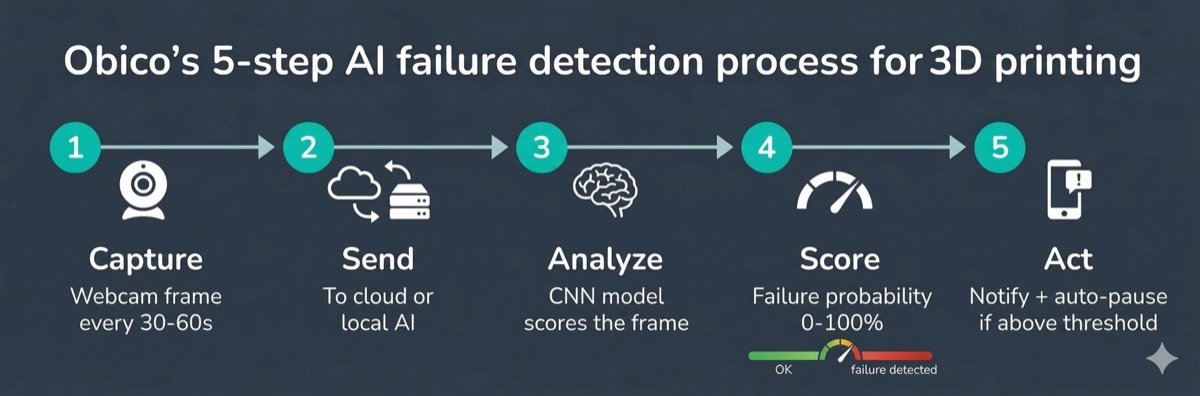
The process works like this:
- Your printer plugin captures a frame from your webcam at regular intervals (typically every 30–60 seconds, configurable)
- The frame is sent to the Obico AI engine — either in the cloud or locally if you're self-hosting
- The model analyzes the frame and produces a confidence score representing how likely a failure is
- If the score exceeds your threshold, Obico triggers an action — typically a notification to your phone, and optionally an automatic print pause
- The result is logged so you can review the timeline after a print
The model is a convolutional neural network trained on hundreds of thousands of 3D printing images — both normal prints and failures of various types, from many different printers, webcam setups, lighting conditions, and filament colors.
☁️ Cloud vs. Self-Hosted Detection
| Cloud | Self-Hosted | |
|---|---|---|
| Where AI runs | Obico's servers | Your hardware |
| Latency | ~seconds | Minimal |
| Hardware needed | Any (Pi, etc.) | GPU recommended |
| Data leaves network | Yes | No |
In the cloud version, frames are sent to Obico's servers for inference. This means detection works even on low-powered hardware (Raspberry Pi, etc.) since the heavy computation runs on our end.
In the self-hosted version, the model runs locally. A GPU significantly speeds up inference, but it works on CPU too. No webcam images leave your network.
🔍 What Does Obico Detect?
Obico's AI detects the most common catastrophic print failures — the ones that waste the most filament and time.
🍝 Spaghetti
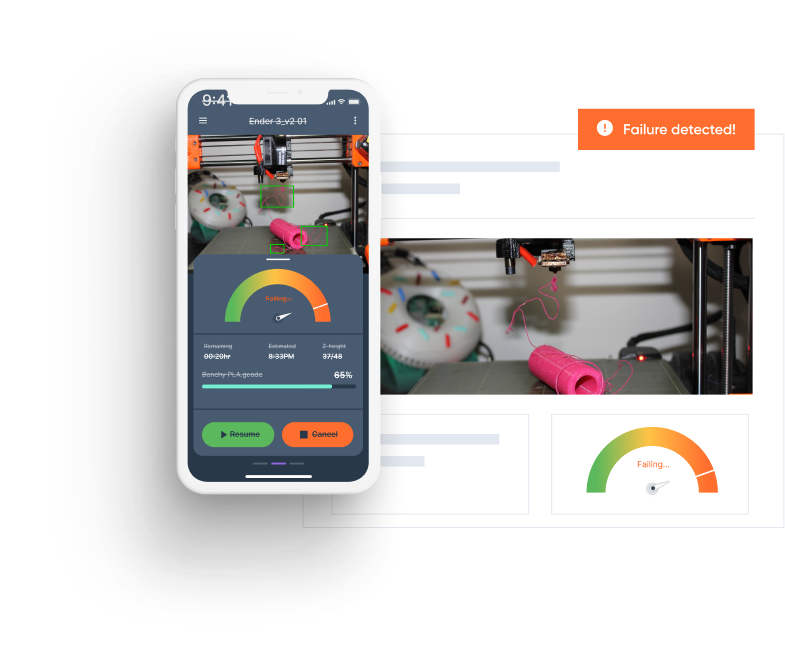
The classic failure mode: filament extruding into mid-air, creating a tangled mess. This is the failure type Obico was originally designed to detect, and it remains the strongest. The visual signature is distinctive — chaotic filament strands across the print area.
Read more: What is spaghetti in 3D printing and how to fix it
📐 Print Detachment
When a print lifts off the bed — warping, poor adhesion, or a mechanical bump. The AI detects the gap between the print and bed or the changed geometry. Detachment is harder to catch than spaghetti because the visual change can be subtle early on, but once the print is visibly lifting, detection is reliable.
↔️ Layer Shifts
When the printer loses position (stepper motor skip, mechanical obstruction) and subsequent layers print offset. Detection depends heavily on camera angle — a side view catches this much more reliably than top-down.
🔵 Nozzle Blobs
Filament accumulating on the nozzle, which can eventually drop onto the print or cause a jam. The AI detects large accumulations, though smaller blobs are harder to distinguish from normal print features.
⚠️ What Obico Doesn't Detect (Yet)
We want to be clear about the limitations:
- Clogs and under-extrusion — often no strong visual signature until the print has already failed significantly
- Stringing and minor quality issues — the AI is trained on catastrophic failures, not quality problems
- Early-stage failures — if the failure is very small or just beginning, the AI may not flag it until it becomes more severe
- Complex geometries — unusual print shapes can sometimes resemble failure patterns
- First-layer issues — the standard AI watches for mid-print failures (but see First Layer AI below)
For general troubleshooting beyond what AI detection covers, our 3D print troubleshooting guide covers the full range of failure modes.
🎯 What About False Positives?
False positives — where Obico flags a failure that isn't actually happening — are real. We won't pretend otherwise.
Common causes:
| Cause | Why It Happens | Fix |
|---|---|---|
| Complex print geometries | Supports/infill can resemble spaghetti | Lower sensitivity slightly |
| Difficult lighting | Backlighting, shadows, flickering confuse the model | Add consistent, diffuse lighting |
| Unusual filament colors | Transparent/very light filaments reduce contrast | Improve lighting, lower sensitivity |
| Camera vibration | Blurry/motion-affected frames trigger false readings | Use a stable camera mount |
| Dark prints on dark bed | Low contrast = less visual information | Add an LED ring light |
🎛️ Sensitivity Tuning
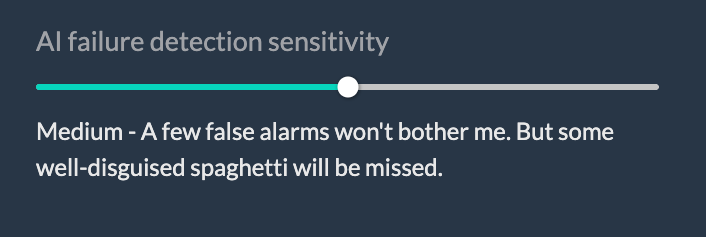
Obico has a sensitivity control — you can adjust how aggressively the AI triggers alerts. Lowering sensitivity means the AI needs a higher confidence score before triggering, reducing false positives at the cost of potentially missing some real failures.
- Start at the default sensitivity for a few prints and see how it behaves
- If you get frequent false positives, reduce sensitivity by one notch and observe
- If you want to catch everything and can tolerate occasional false pauses, increase sensitivity
This is a trade-off that every computer vision detection system faces. There's no magic setting that eliminates false positives while catching everything — you're tuning a threshold on a probability score.
🚀 Obico's 2nd-Generation AI Model
We've developed and deployed a 2nd-generation AI model that improves on the original in several key ways.
The 2nd-gen model was trained on a significantly larger and more diverse dataset — importantly, including labeled failure images contributed by our user community. Real-world failure images from real printers are far more valuable for training than synthetic data.
Key improvements:
- ✅ Fewer false positives on complex geometries — better at distinguishing supports and infill from actual spaghetti
- ✅ Better performance on lower-quality webcams — more robust to blur and compression artifacts
- ✅ Improved layer shift detection — particularly on side-angle camera views
- ✅ Better calibration — confidence scores correlate more reliably with actual failure probability
The 2nd-gen model is the default for all cloud users. If you're self-hosting, updating your server will get you the latest model.
Every time you mark a detection as a false positive (or confirm a real failure), that's data that helps improve future model versions. If you use Obico and take a moment to give feedback, you're directly contributing to making it better for everyone.
🔬 First Layer AI — Nozzle Camera Detection
Standard failure detection watches for mid-print failures. But first-layer problems are extremely common and can doom a print from the start. We've been working on a dedicated solution.
Celestrius (First Layer AI) is our nozzle-camera-based first-layer inspection system. It uses a camera mounted near the nozzle — looking down at the first layer as it's being deposited — and analyzes the extrusion in real time.
It detects:
- 🔍 Under-extrusion at the first layer
- 🔍 Poor bed adhesion starting immediately
- 🔍 Incorrect first-layer height
- 🔍 Inconsistent extrusion
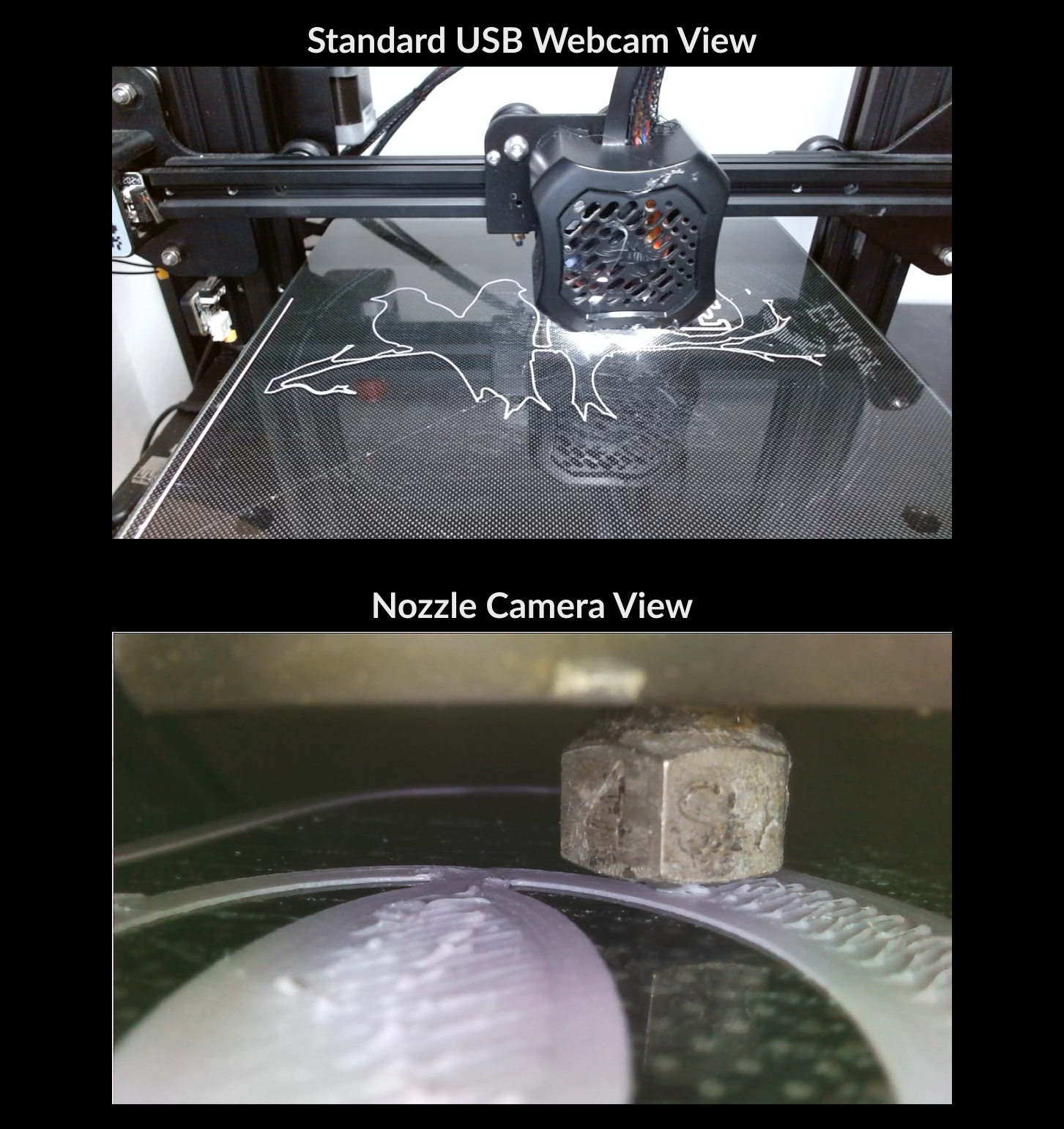
This is a fundamentally different detection approach from the main failure detection AI. Standard monitoring looks at the overall print state; First Layer AI looks at individual extrusion beads as they're laid down.
Learn more about the Obico First Layer AI program.
💡 Tips for Getting the Best Results from Obico's AI
Based on what we've seen across hundreds of thousands of monitoring sessions:
📷 Camera Placement
- Slightly elevated side angle is generally better than straight top-down. Side views give you layer shift visibility; top-down can miss them entirely
- Distance: The print should fill a reasonable portion of the frame — too small means less visual information for the AI
- Stable mount: Mount the camera to the frame or something that doesn't move with the print head
💡 Lighting
Consistent, diffuse lighting is the single biggest thing you can do to improve Obico's detection accuracy. An LED ring light or diffused overhead light dramatically reduces false positives.
- ❌ Avoid backlighting — silhouettes are hard for the model to analyze
- ❌ Avoid direct point light sources that create harsh shadows
- ✅ LED ring lights or diffused overhead lighting work well
- ✅ Even a simple DIY LED strip inside the enclosure helps significantly
🎛️ Sensitivity Settings
- Start at default and adjust after your first few prints
- Overnight/unattended prints: Default or slightly lower (a false stop is annoying)
- Short prints you can easily restart: Higher sensitivity for earlier warnings
📝 Provide Feedback
When Obico sends you a failure notification, check the print. If it was a false positive, mark it as such in the app. This feedback — even from just your own setup — helps calibrate how you read the alerts, and aggregated community feedback improves the model.
⚔️ How Obico AI Compares to Competitors
| Platform | AI Detection | What It Detects | False Positive Controls | Open Source |
|---|---|---|---|---|
| Obico | ✅ Core feature | Spaghetti, detachment, shifts, blobs | ✅ Sensitivity slider | ✅ |
| OctoEverywhere (Gadget) | ⚠️ Add-on | Primarily spaghetti | ⚠️ Limited | ❌ |
| Bambu Lab built-in | ✅ (Bambu only) | Basic failure detection | ⚠️ Limited | ❌ |
| SimplyPrint | ⚠️ Basic | Limited failure types | ⚠️ Limited | ❌ |
Obico has the deepest AI detection feature set of any platform that works across OctoPrint, Klipper, and Bambu printers. It's also the only major platform with a fully open-source detection system that can run locally.
The honest comparison: Bambu Lab's built-in monitoring works well for Bambu printers in normal conditions. For Bambu users who want more, or for anyone running OctoPrint or Klipper, Obico provides a more capable and transparent detection system.
For a broader comparison, see our best 3D printer failure detection comparison.
❓ Frequently Asked Questions
How accurate is Obico's AI?
We don't publish a single accuracy number because it varies significantly with setup — camera quality, lighting, print geometry, and filament type all matter. In good conditions (stable lighting, decent camera, clear print area), catch rates for spaghetti and detachment are high. Edge cases and difficult conditions will always be harder.
Can Obico pause my printer automatically when it detects a failure?
Yes. Obico can send a pause command to OctoPrint, Moonraker (Klipper), or Bambu printers when a failure is detected above your threshold. You can configure whether it pauses automatically or just sends you a notification.
Why did Obico flag my print as failed when it was fine?
False positives happen. The most common causes are complex geometry (supports, infill patterns), challenging lighting, or unusual filament colors. Try lowering the sensitivity setting one notch and check your camera's lighting and angle. If it keeps happening on a specific print type, that's useful feedback — mark it as a false positive in the app.
Why did Obico miss a failure?
Misses (false negatives) can happen when the failure develops slowly, the camera angle doesn't capture it well, or the failure type doesn't have a strong visual signature (like under-extrusion or slow clogs). Layer shifts are often missed with top-down cameras — a side angle significantly improves detection.
Does Obico only detect spaghetti?
No — spaghetti is the original and strongest detection category, but Obico also detects print detachment, layer shifts, and nozzle blobs. The First Layer AI program adds first-layer inspection capabilities.
How is Obico different from The Spaghetti Detective?
Obico is The Spaghetti Detective — we rebranded in 2022 to reflect that the platform had grown beyond just spaghetti detection. Same team, same codebase, same community.
Can I contribute images to help train the AI?
Yes! You can opt in to contribute labeled images from your prints. Failed print images with accurate labels are especially valuable. Reach out through the Obico community channels if you'd like to contribute systematically.
Does Obico work with timelapse cameras?
Obico works with standard webcams used for monitoring and can generate timelapses from the same feed. The webcam setup for monitoring and timelapse are the same.
AI-powered failure detection is genuinely useful — but it's not magic, and we don't want to oversell it. Used with reasonable expectations and a decent camera setup, it catches the majority of catastrophic failures before they waste hours of print time and filament. That's a real win.
We're continuing to improve the models and add new detection capabilities, and the community's feedback is central to that process.