Obico Privacy & Data Security Explained

Obico collects standard account data (email, usage) and processes webcam images to power AI failure detection. We use aggregated, anonymized data to improve the AI model — we do not sell your data to third parties. If you prefer zero data leaving your network, Obico is fully open-source and can be self-hosted on your own hardware.
When you connect a webcam to a cloud service, privacy is a legitimate concern. We want to be straightforward about exactly what Obico collects, why we collect it, and what choices you have.
This isn't a legal document — it's a plain-English explanation of how we handle your data.
📋 What Data Does Obico Collect?
Obico collects the following categories of data:
Account and Profile Data
When you create an account, we collect your email address and optionally your name. This is used for authentication, sending you notifications, and support communication. Standard stuff.
Usage Data
We collect data about how you use the platform: which features you use, how often, error logs, and technical diagnostics. This helps us identify bugs and prioritize features. We also use cookies and standard web analytics.
Printer and Print Data
When you connect a printer, we store configuration data (printer name, type, connection settings) and print history (filenames, print duration, status). This powers features like print history and G-Code storage.
Webcam Images
This is the category people ask about most — we cover it in detail in the next section.
- ❌ Payment card numbers (handled by our payment processor, Stripe)
- ❌ Passwords in plaintext (stored as hashed values)
- ❌ Data from your local network beyond what you explicitly send to Obico
Our full privacy policy is available on the Obico website.
📸 How Obico Uses Your Webcam Images
Obico's core feature is AI-powered failure detection. For that to work, the webcam feed from your printer needs to be processed by the AI model.
Here's how it actually works:
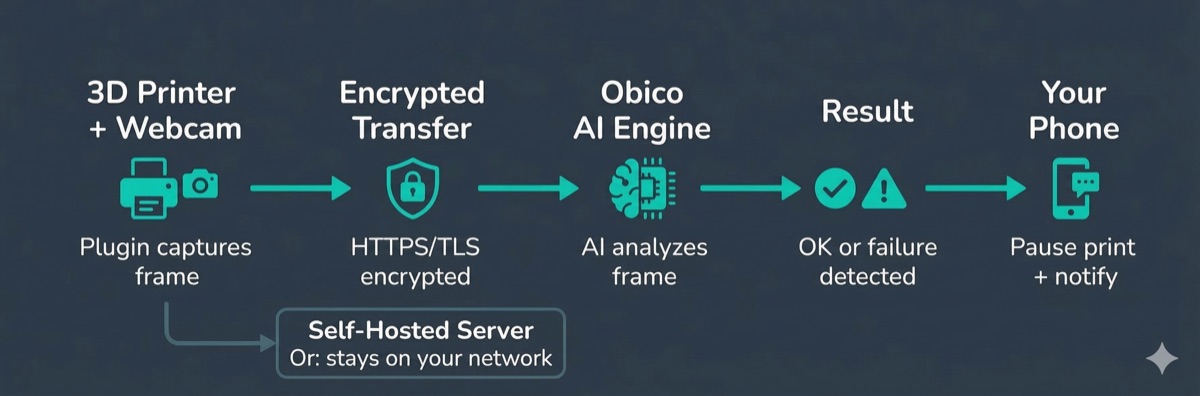
- Your OctoPrint/Klipper/Bambu plugin captures frames from your webcam at regular intervals during a print
- Frames are sent to Obico's servers over an encrypted HTTPS connection
- Our AI model analyzes each frame to detect signs of failure — spaghetti, detachment, layer shifts, nozzle blobs
- The result (OK or failure detected) is sent back to your plugin, which can trigger an automatic pause or notification
The images are processed in real time. We retain a limited number of recent images per printer to power features like the print snapshot gallery in your dashboard.
How Webcam Images Improve the AI
Here's where we want to be especially transparent: we do use images from our user base to train and improve the AI model.
Specifically:
- We use aggregated and anonymized data. Images are not linked to your account in the training pipeline.
- The AI has been trained on hundreds of thousands of 3D printing images — this is how it's gotten good at detecting failure types across a huge range of printers, filaments, and lighting conditions.
- Users can explicitly opt in to contribute labeled failure images, which helps the AI learn edge cases faster.
If you need your webcam images to stay entirely within your own infrastructure, self-hosting is the answer. See the self-hosting section below.
🚫 Does Obico Sell Your Data?
No. We do not sell your personal data or webcam images to third parties.
We share data only in these limited circumstances:
- Service providers who help us operate the platform (e.g., cloud hosting, payment processing, email delivery) — contractually bound to not use your data for their own purposes
- Legal requirements — if required by law or valid legal process
- Business transfer — if Obico is acquired, user data would transfer as part of that transaction (standard for any SaaS business)
We do not share your data with advertisers. We do not use your webcam images for anything other than operating and improving the AI detection service.
🖥️ Obico Self-Hosting — Complete Data Control
If the cloud data model doesn't work for your situation, Obico is fully open-source and can be self-hosted on your own hardware.
When you self-host:
- ✅ All data stays on your network. Webcam images are processed locally — they never leave your server
- ✅ No Obico cloud involvement. Your printer talks to your self-hosted server, not to obico.io
- ✅ You can audit the code. The entire server codebase is on GitHub. No hidden data collection mechanisms
- ✅ Full feature access. Self-hosted Obico has all the same features as the cloud version, including AI detection
Self-hosting requires a Linux server (Raspberry Pi or similar) with Docker. Local AI detection runs on CPU by default — a GPU speeds things up but isn't required. Setup takes roughly 30–60 minutes for someone comfortable with the command line.
Self-hosting is the right choice for:
- 🏭 Print farms and professional environments with data governance requirements
- 🌍 Users in jurisdictions with strict data residency rules
- 🔒 Privacy-conscious makers who want zero cloud dependency
- 🛠️ Anyone who simply prefers to keep their data on their own hardware
🔐 How Obico Cloud Security Works
For users on the cloud plan, here's how we secure the platform:
Encryption in Transit
All communication between your printer plugin and Obico's servers uses HTTPS/TLS encryption. Webcam streams and API calls are encrypted in transit.
The secure tunnel for remote access uses encrypted connections — you don't need to open ports in your router or set up a VPN.
Secure Tunnel Architecture
Obico's remote access tunnel is built so that you never need to expose your printer's local interface to the open internet. Traffic goes through Obico's relay servers with authentication checks.
This is actually more secure than many DIY remote access setups that involve port forwarding or running OctoPrint directly on a public IP.
Account Security
Standard practices: password hashing, support for strong passwords, session management. We recommend using a strong unique password for your Obico account (and a password manager if you're not already using one).
Infrastructure
Obico's cloud infrastructure runs on major cloud providers with standard security practices. We don't manage physical servers.
We'll be honest: we're a small team. We take security seriously and follow industry-standard practices, but we're not a security-first enterprise company with a 24/7 SOC. If you discover a security issue, please contact us — we respond to responsible disclosure.
⚖️ Obico vs Competitors on Privacy
| Platform | Open Source | Self-Hosting | Data Sold? | Local AI Option |
|---|---|---|---|---|
| Obico | ✅ Server + plugins | ✅ Full | ❌ No | ✅ Self-hosted |
| Bambu Cloud | ❌ | ❌ | ⚠️ Unknown | ❌ |
| OctoEverywhere | ⚠️ Plugin only | ❌ | ❌ (per policy) | ❌ |
| AstroPrint | ⚠️ Desktop app only | ⚠️ Partial | ❌ (per policy) | ❌ |
Bambu Cloud is the most significant comparison for many users today, since Bambu printers use it by default. Bambu's privacy policy is less transparent than Obico's, and their platform is proprietary — you can't audit what's happening or run it locally. Obico works with Bambu printers and gives you an alternative monitoring layer with more transparency. See our Bambu AI failure detection guide for details.
OctoEverywhere has a solid privacy track record as a tunneling service. Their data exposure is lower by design (they're mostly proxying traffic, not storing images). However, they don't offer self-hosting.
The core Obico differentiator on privacy is the combination of transparency (open-source code you can audit), choice (cloud or self-hosted), and honest communication (this very article). We'd rather explain our practices clearly than hide behind legal language.
❓ Frequently Asked Questions
Is Obico safe to use?
Yes. Obico uses encrypted connections, doesn't sell your data, and follows standard security practices. The self-hosted option is available if you want zero cloud involvement. The main data flow — webcam images going to the cloud for AI processing — is a deliberate trade-off for failure detection functionality. If that trade-off doesn't work for you, self-host.
Can Obico see my prints through my webcam?
Technically yes — in the cloud version, your webcam frames are sent to Obico's servers for AI processing. Obico staff don't sit and watch your prints, but the infrastructure does process your images. If this concerns you, self-hosting eliminates that entirely.
Does Obico store my webcam footage permanently?
No. We retain a limited number of recent frames per printer for the print gallery feature. We don't archive your entire print history as video footage.
How do I delete my data?
You can delete your Obico account from within the account settings. When you delete your account, your personal data is removed from our systems.
Is Obico GDPR compliant?
We have users in the EU and take GDPR seriously. Our privacy policy covers data rights including access, correction, and deletion. For specific GDPR inquiries, contact us at the email in the privacy policy.
Can I use Obico without a webcam?
Yes — you can use Obico for remote printer access, G-Code management, and notifications without a webcam. AI failure detection requires a webcam since it's vision-based, but the rest of the platform works without one.
What happens to my data if I cancel?
If you cancel your Obico account, you can request data deletion. We don't retain your personal data after account deletion beyond what's required by legal obligations (e.g., transaction records for a limited period).
Does the OctoPrint plugin send anything besides webcam images?
The Obico plugin sends webcam frames (for AI detection), print status updates (current layer, progress, print state), and printer telemetry (temperatures, speeds). This is what enables the remote monitoring dashboard. Nothing from your local filesystem or network beyond print-related data is transmitted.
We know privacy is not a one-size-fits-all topic. Some users are completely comfortable with the cloud model; others want nothing leaving their LAN. Obico is designed to support both.
If you have specific questions about data handling that aren't answered here, reach out to us — we'd rather answer your question directly than have you left with uncertainty.